
Program Description
SuretyForge Inc. sends transactional text messages to bond applicants and clients on behalf of the insurance agency servicing their bond. We send four kinds of messages, and only these kinds of messages:
- One-time sign-in and multi-factor authentication (2FA) codes — used to verify your identity when you log in to your secure client portal.
- Bond service notices — when a change you requested on a bond is approved or completed, a rider is issued, or a verification certificate is ready.
- Invoice and payment notifications — including the amount due, the due date, and a secure link to pay online.
- Identity-verification codes for electronic signing — used when electronically signing an indemnity agreement, to confirm that the person signing is the person who enrolled the phone number.
These messages are strictly transactional. We do not send marketing, promotional, or advertising text messages of any kind, and a phone number enrolled for one of the purposes above will never receive an unrelated marketing message.
How You Opt In
You opt in yourself, by checking a consent box that is never pre-selected and never checked on your behalf by an agency employee. There are exactly two places this happens:
- On a bond application. The contact step asks for your mobile number and shows the consent language quoted below beside an empty checkbox. Checking it is optional: consent is never a condition of getting a quote or buying a bond, and if you leave it unchecked we do not text you.
- Inside your secure client portal. You enter your own mobile number, we send a one-time code to it, and you enter that code back into the portal to prove you own and control the number. You then check the consent box, by message category, before your number is enrolled.
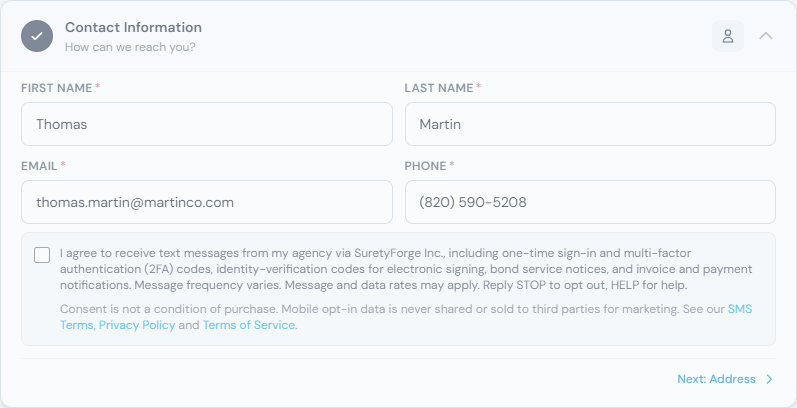
Your consent — the exact language you agreed to, the number it applies to, a timestamp, and the network address it came from — is recorded in our system. The only message we will ever send to a number that has not yet consented is the one-time code you just asked us to send in order to verify that number. Everything else — service notices, invoice notices, sign-in and 2FA codes — goes only to numbers that have completed the consent step above.
The Consent Language
This is the language shown beside the consent checkbox on a bond application, at the moment of opt-in. It is quoted verbatim below, not paraphrased. The portal’s per-category checkboxes carry these same terms, worded for the categories you are choosing:
“I agree to receive text messages from my agency via SuretyForge Inc., including one-time sign-in and multi-factor authentication (2FA) codes, identity-verification codes for electronic signing, bond service notices, and invoice and payment notifications. Message frequency varies. Message and data rates may apply. Reply STOP to opt out, HELP for help. See our Privacy Policy and Terms of Use. Consent is not a condition of purchase. Mobile opt-in data is never shared or sold to third parties for marketing.”
Message Frequency
Message frequency varies and is driven by your own bond activity — how often you sign in, whether a bond of yours is approaching renewal, and whether you have an invoice due. Most enrolled numbers receive well under ten messages a month; a number with no active sign-ins, renewals, or invoices in a given month may receive none.
Cost
Message and data rates may apply, depending on your mobile carrier and plan. SuretyForge does not charge for text messages; any per-message charges come from your wireless carrier.
Opt-Out and Help
Reply STOP to any message we send and you will be unsubscribed immediately — no further messages will be sent to that number until you opt in again. Reply HELP to any message for help, or contact support@suretyforge.com. You can also disable SMS at any time from your account settings in the client portal.
Sample Messages
Two examples of the actual message content sent by this program:
SuretyForge
Your Agency · via SuretyForge
Bracketed fields ([number], [MM/DD/YYYY], [link]) are populated per bond and per recipient at send time.
Carriers & Aggregators
Messages are sent from a verified toll-free number through a registered messaging platform. Our program complies with CTIA Messaging Principles and Best Practices and with the acceptable-use requirements of the wireless carriers and aggregators that deliver our messages. We do not share the mobile numbers collected for this program with third parties for their own marketing purposes.